Protect Your Home and Wallet: Unplug These 5 Appliances When You’re Done Using Them
Why unplug: That glowing clock or “ready” light? It’s using electricity 24/7. A typical programmable coffee maker can draw 1–5 watts continuously in standby mode . Over a year, that’s enough to power a LED bulb for weeks.
When to unplug: If you don’t use the programmable feature daily, unplug after brewing. For daily users, consider a smart plug on a timer.
Pro tip: Wipe down your coffee maker before unplugging to prevent mineral buildup. A clean machine lasts longer and brews better.
4. Entertainment Centers: TVs, Gaming Consoles, and Sound Systems
Why unplug: Modern electronics often stay in “instant-on” or standby mode to enable remote control or quick startup. But this convenience comes at a cost: a single TV can draw 1–5 watts in standby; gaming consoles may draw 10+ watts .
When to unplug: At night or when leaving for extended periods. Use a power strip to unplug multiple devices with one switch.
Pro tip: Label your power strips (“Living Room,” “Office”) so you know exactly what you’re turning off. Make it a bedtime ritual: lights out, devices unplugged.
5. Hair Styling Tools: Straighteners, Curling Irons, and Hair Dryers
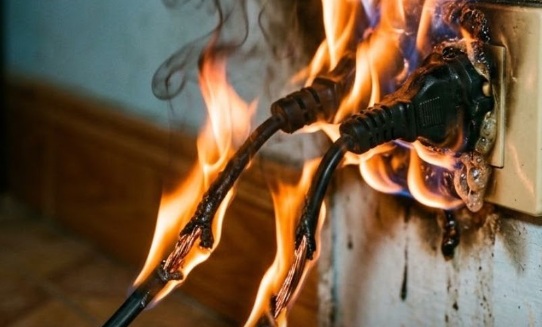
Why unplug: These high-wattage devices pose a fire risk if left plugged in and accidentally activated . Even when “off,” some continue to draw minimal power. More importantly, unplugging eliminates the chance of a faulty switch causing overheating.
When to unplug: Immediately after use, once the tool has cooled. Store cords loosely coiled to prevent wire damage.
Pro tip: Place a heat-resistant mat near your styling station. Let tools cool on the mat before unplugging and storing—safer for your counters and your peace of mind.
Smart Strategies to Make Unplugging Easy (Not Exhausting)
✨ Use smart power strips: These cut power to multiple devices with one switch or via app control. Ideal for entertainment centers or home offices .
✨ Create “unplug zones”: Designate areas where unplugging is routine—like the kitchen counter or bedside table. Habits form faster with visual cues.
✨ Set phone reminders: A gentle nightly alert (“Unplug chargers!”) can help build the habit without mental load.
✨ Involve the family: Make it a game: “Who can remember to unplug the most devices this week?” Small rewards reinforce positive behavior.
✨ Start with one appliance: Don’t overhaul your whole home at once. Pick one item from this list and master that habit first.
Safety First: What to Know Before You Unplug
🔹 Pull the plug, not the cord: Always grasp the plug head to avoid damaging wires or creating shock hazards.
🔹 Let hot appliances cool first: Unplug hair tools or space heaters only after they’ve cooled to avoid burns or fire risk.
🔹 Check for warranty requirements: Some devices (like certain medical equipment) should remain plugged in. When in doubt, consult the manual.
🔹 Surge protection matters: For devices you keep plugged in (refrigerator, router), use a quality surge protector to guard against power spikes.
🔹 Don’t unplug essential safety devices: Smoke detectors, security systems, and medical devices should remain powered unless manufacturer instructions say otherwise.
Frequently Asked Questions
Q: How much money can I really save?
A: Phantom power can account for 5–10% of household electricity use. For the average U.S. home, that’s $100–$200 per year . Unplugging just a few key devices can recoup a meaningful portion of that.
Q: Won’t frequent unplugging damage my appliances?
A: For most modern electronics, occasional unplugging is fine. However, devices with internal clocks or memory settings (like some ovens) may need resetting. Use smart strips to avoid this hassle.
Q: Are smart plugs worth it?
A: If you struggle to remember unplugging, yes. Smart plugs let you schedule power cuts or control devices remotely. They pay for themselves in energy savings over time .
Q: What about refrigerators and freezers?
A: Never unplug these unless performing maintenance. They’re designed to run continuously. Focus on smaller, intermittent-use appliances instead.
Q: Does unplugging help the environment?
A: Absolutely. Reducing phantom power lowers overall electricity demand, which decreases fossil fuel consumption and greenhouse gas emissions .
A Gentle Closing Thought
Protecting your home and wallet doesn’t require grand gestures. Sometimes, the most powerful actions are the smallest: a hand reaching for a plug, a moment of intention before bed, a habit formed with patience.
You don’t have to unplug everything. You don’t have to be perfect. Start with one appliance. Notice how it feels to take that small step. Then, when you’re ready, add another.
Your home is your sanctuary. Your resources are precious. And you deserve to feel secure in both.
If this article brought you clarity or motivation, I’d love to hear from you. Which appliance will you unplug first? What tips have worked for you? Drop a comment below. And if you know someone who’d benefit from this gentle reminder, please share it with them. Sometimes the greatest gift we can offer is the quiet encouragement to take one small step toward peace of mind.
With warmth and respect,
A friend who believes in practical care for home and heart 💙
Disclaimer: This article is for informational purposes only and is not electrical or safety advice. Always follow manufacturer instructions for your appliances. If you have concerns about electrical safety, consult a licensed electrician. Individual energy savings vary based on usage, local rates, and device efficiency.